Platform backups
Nightly encrypted backups of the platform's state to the provider's object storage, and the way back into a new cluster with shpyrd cluster restore.
This page is about a cluster you run: its platform backup. On shpyrd cloud the platform is run for you: see Getting started. Every night the platform writes an encrypted archive of its state to a bucket in your cloud provider's object storage, outside the cluster: projects, config vars, resources, the sources apps build from, sign-in users, teams and members. Lose the cluster, build a new one, shpyrd cluster restore, and the projects build and start again.
What is in a backup
| Included | Not included |
|---|---|
| Every project: its namespace, config vars, apps (build settings, processes, sizes, bindings), volumes, databases, caches, log drains, custom domains | Data inside volumes and databases. Volumes are recreated empty; a restored Postgres starts empty because its own archive (point-in-time recovery) lives in the cluster's object storage and goes with the cluster |
| The source archives apps were built from, so a restored app builds again without a redeploy | The release history: a restored app starts at v1 with its current config vars |
Sign-in users and connectors (auth-local), teams, project members | The install record is carried for reading, not applied: the new cluster's settings come from its own cluster init |
| The instance size catalog and global config vars | Credentials controllers regenerate: registry, bucket keys, certificates |
The archive is a tar.gz encrypted with age and a passphrase generated at setup. Without the passphrase a backup is noise; print it once and keep it outside the cluster:
shpyrd cluster backup key > shpyrd-prod-backup-key.txtSetting it up
Backups go to a bucket that outlives the cluster, so the bucket is not part of the cluster's Terraform state. A small root of its own creates it:
Oracle Cloud
cd contrib/oci/terraform/backupscp terraform.tfvars.example terraform.tfvars # tenancy, region, name (same as the cluster root)terraform init && terraform applyThis creates the bucket <name>-backups, an IAM user with a Customer Secret Key that opens only that bucket, and writes the key to <name>-backups.env (git-ignored). A new key takes a few minutes to become usable. Then tell the cluster root about the bucket:
cd ..echo 'backup_bucket = "shpyrd-prod-backups"' >> terraform.tfvarsterraform apply # only <name>.vars changes: the target, endpoint and regionshpyrd cluster init --context oke-shpyrd-prod --profile oci --vars-file shpyrd-prod.vars \ --backup-credentials-file backups/shpyrd-prod-backups.envAWS
cd contrib/aws/terraform/backupscp terraform.tfvars.example terraform.tfvars # name, region, profile (same as the cluster root)terraform init && terraform applyThis creates the bucket <name>-backups-<account id> (public access blocked, encrypted at rest). Then tell the cluster root about it; it grants the platform's service account access through EKS Pod Identity, no keys anywhere:
cd ..echo 'backup_bucket = "shpyrd-prod-backups-123456789012"' >> terraform.tfvarsterraform apply # the Pod Identity association and <name>.varsshpyrd cluster init --context eks-shpyrd-prod --profile aws --vars-file shpyrd-prod.varsAny S3-compatible bucket
Without Terraform, or on a local cluster, name the target yourself:
shpyrd cluster init --backup-target s3://my-bucket/shpyrd \ --set SHPYRD_BACKUP_ENDPOINT=https://s3.example.com --set SHPYRD_BACKUP_REGION=us-east-1 \ --backup-credentials-file creds.env # AWS_ACCESS_KEY_ID=… and AWS_SECRET_ACCESS_KEY=…cluster init installs the platform-backup component: a CronJob in shpyrd-system running at 03:00 UTC (--set SHPYRD_BACKUP_SCHEDULE="0 3 * * *") that keeps the 14 newest archives (--set SHPYRD_BACKUP_KEEP=14). Without a target the component is skipped.
Day to day
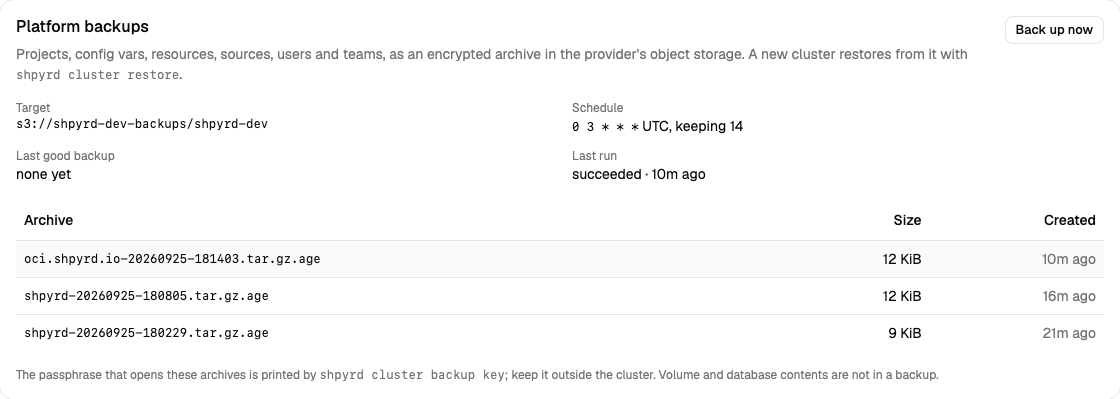
shpyrd cluster backup # one now; waits and prints the archiveshpyrd cluster backups # target, schedule, last good backup, archives, recent runsTarget: s3://shpyrd-prod-backups/shpyrd-prod (an access key)Endpoint: https://ns.compat.objectstorage.sa-saopaulo-1.oraclecloud.comSchedule: 0 3 * * * UTC, keeping 14Last good: 6h ago
ARCHIVE SIZE CREATEDoci.example.com-20260925-030000.tar.gz.age 11.8 KiB 6h agooci.example.com-20260924-030000.tar.gz.age 11.6 KiB 1d agoThe cluster page of the dashboard shows the same card with a "Back up now" button (cluster admins). Archives are named after the platform's domain and the time (UTC).
Restoring
The restore needs three things: a cluster that runs the platform, the archive, the passphrase.
Build the cluster and install the platform as for a new one (
terraform apply,shpyrd cluster init --vars-file …). The new infrastructure's addresses and zone identifiers come from its own vars file; the archive carries the old install record for reading only. Enable the same extensions (--enable postgres…), or their objects are skipped with a warning.Look before you apply.
--dry-rundownloads and decrypts the newest archive (or the one you name) and lists what it holds:shpyrd cluster restore --context oke-shpyrd-prod \ --from s3://shpyrd-prod-backups/shpyrd-prod --passphrase-file shpyrd-prod-backup-key.txt --dry-runOn the same cluster the credentials, endpoint and region come from the cluster's own backup target; on a fresh one give
--credentials-file backups/<name>-backups.env(Oracle) or let~/.aws/credentialssign (--aws-profile; AWS), with--endpointand--regionwhere needed.Restore. System objects (sizes, globals, users, teams, members) are created or replaced; each project is created when its namespace is absent and skipped when it exists. Sources are uploaded to the server first, then volumes, databases, caches, drains and apps are created in that order, and the controllers take it from there: builds run, instances start, certificates are issued.
shpyrd cluster restore --context oke-shpyrd-prod \ --from s3://shpyrd-prod-backups/shpyrd-prod/oci.example.com-20260925-030000.tar.gz.age \ --passphrase-file shpyrd-prod-backup-key.txt
One project only. Deleted a project by mistake? --project <slug> restores just that one from the newest archive (repeat the flag for several); --no-system leaves users and teams alone:
shpyrd cluster restore --from s3://shpyrd-prod-backups/shpyrd-prod \ --passphrase-file shpyrd-prod-backup-key.txt --project shop --no-system--overwrite updates objects that already exist, projects included (their apps are re-applied with the archived settings). --file <archive> restores from a downloaded archive instead of the bucket.
Good to know
- The passphrase is the backup.
shpyrd cluster backup keyprints it; the API never serves it and the dashboard never shows it. Keep it where you keep the cluster's other secrets, not in the cluster. - Postgres data. Databases keep their own continuous archive for point-in-time recovery in the cluster's object storage; it does not travel with the platform backup yet. Take a
pg_dumpfor anything that must survive the cluster. - Access. The archive holds every project's config vars: whoever can read the bucket and has the passphrase reads them. The bucket is private, the key opens only that bucket, and the archive is encrypted; treat the credentials file like the passphrase.
- Costs. Archives are kilobytes to a few megabytes (the sources); object storage bills by the gigabyte-month, effectively nothing at 14 archives.