Extensions and sign-in
Optional capabilities switched on per cluster, and how people sign in to the dashboard with their own accounts.
This page is for the operator of a cluster you run: shpyrd keeps its core small and adds optional capabilities as extensions, Go packages compiled into the binaries and switched on per cluster. On shpyrd cloud the platform is run for you: see Getting started. The first one gives the dashboard real user accounts.
Extensions
shpyrd extensions listshpyrd extensions enable auth-localshpyrd extensions disable auth-local --yesNAME STATUS COMPONENT DESCRIPTIONauth-local enabled dex Sign in with email and password: a bundled Dex issuer stores local accounts (shpyrd users add)auth-oidc enabled - Sign in with a company identity provider: Okta or any OpenID Connect issuer (shpyrd auth oidc set)postgres enabled cnpg PostgreSQL databases for projects (CloudNativePG), attached to apps as DATABASE_URL (shpyrd pg create)redis enabled - Redis-compatible caches and queues for projects (Valkey or Redis), attached to apps as REDIS_URL (shpyrd redis create)object-storage enabled object-storage S3-compatible object store in the cluster (Garage) with a key per consumer: the backing store for Postgres backups and platform backupsmail enabled - Send email from the platform: invitations and notifications over SMTP (shpyrd-ctl mail set)sleep disabled keda, keda-http Scale web processes to zero after a quiet period and wake them on the first request: KEDA and its HTTP add-on (shpyrd sleep)opencost disabled opencost Infrastructure cost allocation via OpenCost — operator economics dashboard (RFC-0075)Enabling installs the extension's component with the same runlevel installer as the base stack (ordering, readiness waits, install record) and restarts the server with the extension; the choice is recorded in the cluster, so shpyrd cluster init and shpyrd cluster status keep it. Disabling removes the component and is refused while resources of the extension still exist. The Cluster page lists every extension with its state.
Extensions contribute an installer component, resource types with controllers, API routes, CLI commands and login providers through a few small Go interfaces. Databases (Postgres, Redis) and shared storage arrive as extensions.
Object storage
shpyrd extensions enable object-storage runs an S3-compatible store in the cluster (Garage, one node on the profile's block storage class, SHPYRD_OBJECT_STORAGE_SIZE: 20Gi locally and on AWS, 50Gi on Oracle Cloud). It is the platform's working store for the extensions that need durable objects — Postgres backups, platform backups — not a bucket service for applications (that comes as a resource type later).
Every consumer gets a bucket and a key that opens only that bucket: an ObjectBucket resource in its namespace produces the bucket shpyrd-<namespace>-<name> and a Secret <name>-object-storage next to it (AWS_ACCESS_KEY_ID, AWS_SECRET_ACCESS_KEY, AWS_ENDPOINT_URL, BUCKET). A key from one project cannot list or read another project's bucket. Optional retention (retentionDays) expires old objects; deletionPolicy: Retain keeps the bucket's contents when the resource goes.
The Cluster page shows the store's volume and every bucket with its size and object count; shpyrd object-storage list prints the same. The store speaks plain HTTP inside the cluster; it is never exposed outside it. Copies that must survive the cluster — the platform's own backups — go to the provider's object storage.
The mail extension gives the platform one SMTP sender, used for invitations and, later, notifications. It has no component of its own: the settings live in the Secret shpyrd-mail of the system namespace, written by the operator and read again every thirty seconds, so a change needs no restart.
shpyrd-ctl extensions enable mailshpyrd-ctl mail set --host smtp.example.com --user postmaster@example.com \ --password @/path/to/password --from "shpyrd <noreply@example.com>"shpyrd-ctl mail statusshpyrd-ctl mail test you@example.comSTARTTLS on port 587 is the default; --tls speaks TLS from the first byte (port 465); --plain is for a relay on a private network only — credentials are never sent unencrypted anywhere else. PLAIN and LOGIN authentication are supported. The test message is sent by the server from inside the cluster, so it proves the settings, the network path and the sender address at once; the Cluster page's Email card shows the status and sends the same test. Deliveries to one address are rate limited (five in ten minutes), and every test and failure is in the audit trail. Without a sender, invitations show their link to whoever invites, to pass along.
Any SMTP relay works, and the two kinds differ in one thing. A commercial provider (Mailgun, SES, Postmark, Resend...) keeps a suppression list per sending domain on every plan: addresses that bounced, complained or unsubscribed are refused from then on, over SMTP as much as over its API, and the list is yours to edit in its panel. A relay of your own does not, and the platform keeps no such list either: its volume is invitations and alerts to people an administrator named, and the rate limit above is the only guard. Either way the platform learns only what the relay answers during delivery; a failure the relay discovers later is in the provider's log, not in the audit trail.
Signing in with an account
Out of the box the dashboard is protected by the admin token (shpyrd cluster token), which is right for one developer and for automation (and can be switched off later, see the admin token). With the auth-local extension, people get their own accounts:
shpyrd extensions enable auth-localshpyrd users add ada@example.com --name "Ada Lovelace" # prompts for the passwordshpyrd users listshpyrd users passwd ada@example.comshpyrd users rm ada@example.comThe sign-in page then asks for email and password directly (the admin token moves behind a small link, and disappears once you disable it). A wrong password is shown in place; ten wrong passwords in a minute for one account are refused before they reach the issuer, and every attempt is in the audit trail. Signed-in users see who they are in the header and can sign out; a Users page lets platform admins add, reset and remove accounts (the same operations as the CLI). What each account may do is decided by teams and roles.
How it works
- The extension installs Dex, an OpenID Connect issuer, at
https://auth.<domain>with a certificate from the cluster issuer. Accounts are Dex objects in the cluster (bcrypt hashes), so they survive restarts, upgrades and even disabling the extension. - The shpyrd server is an OpenID Connect relying party. Email and password never leave shpyrd's own page: the server exchanges them with Dex server to server (the OAuth2 password grant) and verifies the resulting identity token exactly as it would after a redirect. External providers use the authorization code flow with PKCE. Either way: an HttpOnly session cookie, a CSRF token on every change, sessions that expire after 12 hours idle or 7 days, and sign-out that also ends the session at issuers that support it. A company identity provider (Okta, Google, GitHub through Dex) is configuration, not code (next).
- The CLI keeps using your kubeconfig; cluster operations are not affected by dashboard accounts.
Company identity providers
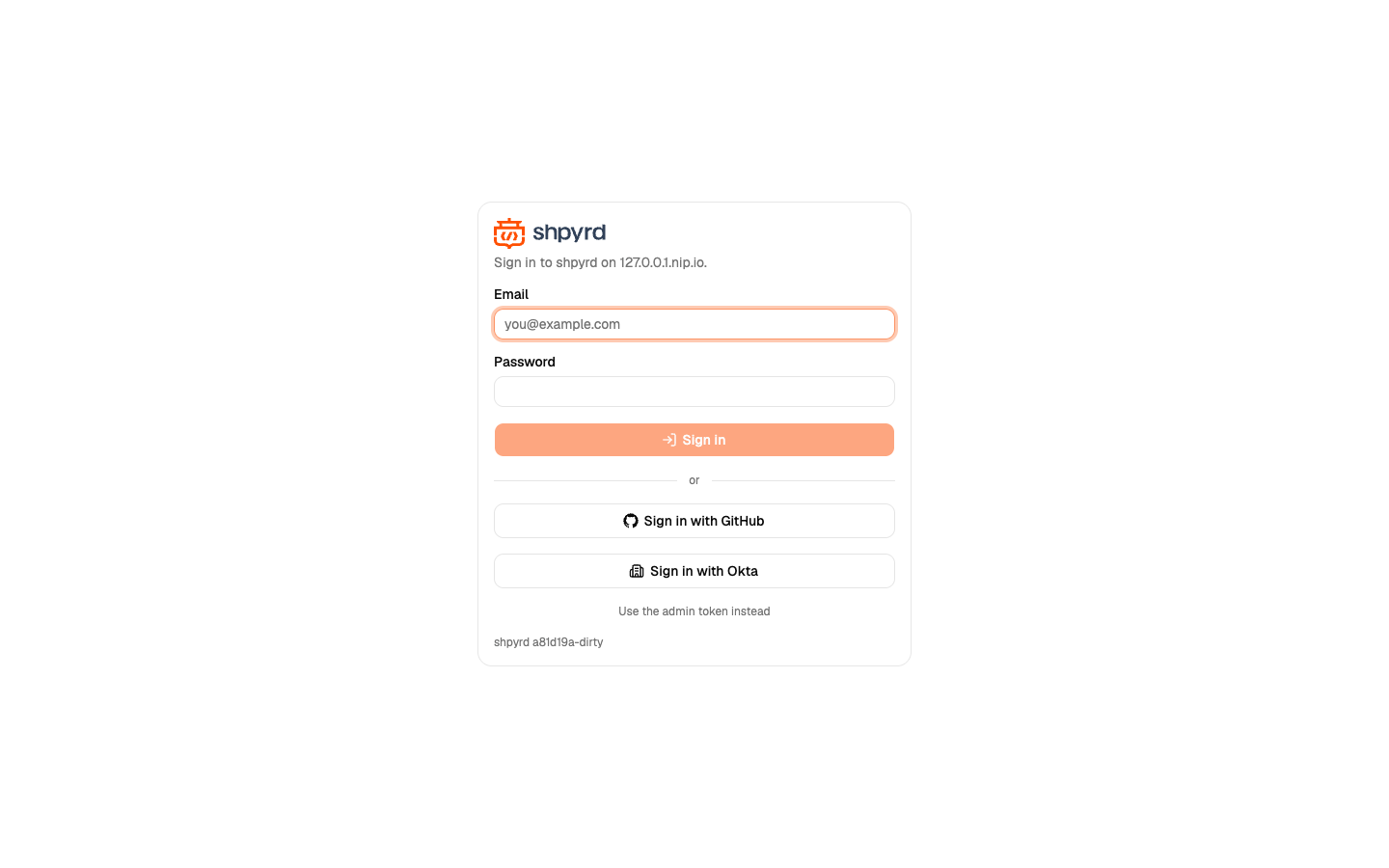
Anyone with an identity provider that speaks OpenID Connect (Okta, Auth0, Keycloak, Microsoft Entra, Google Workspace...) connects it to shpyrd with the auth-oidc extension; GitHub and Google also work through the bundled issuer of auth-local. Every provider becomes a button on the sign-in page. Since v0.9.15 each workspace can add methods of its own on its Sign-in tab (shpyrd sso add), shown on that workspace's login page only — see Your company's sign-in. Users are the same person across providers when the email matches, and roles are granted by email or by group, so an Okta group or a GitHub team can be a shpyrd Team.
Okta, or any OpenID Connect issuer
shpyrd extensions enable auth-oidcshpyrd auth oidc check https://acme.okta.com # what the issuer supports, before creating anythingread -s OKTA_CLIENT_SECRET; export OKTA_CLIENT_SECRET # keep the secret out of the shell historyshpyrd auth oidc set --id okta --label Okta --issuer https://acme.okta.com \ --client-id 0oa... --client-secret "$OKTA_CLIENT_SECRET"shpyrd auth oidc listshpyrd auth oidc remove oktaset validates the issuer by discovery, stores everything in a Secret in the cluster (the secret is never printed again; @path reads it from a file), restarts the server and prints the two URLs to register at the provider:
- Sign-in redirect URI:
https://shpyrd.<domain>/api/auth/callback - Sign-out redirect URI:
https://shpyrd.<domain>/(signing out of shpyrd then signs out of the provider too, for issuers that publish anend_session_endpoint; Okta does)
At Okta: Applications › Create App Integration › OIDC - OpenID Connect, Web Application; grant type Authorization Code; the two URIs above; leave DPoP off. The issuer is the org URL (https://acme.okta.com, not -admin). For groups, either set a groups claim on the application (Sign On › OpenID Connect ID Token › Edit › Groups claim type Filter, groups Matches regex .*) or add a groups claim on a custom authorization server (Security › API › Authorization Servers › default › Claims; the issuer is then https://acme.okta.com/oauth2/default and that server has no groups scope, so register it with --scopes -).
Scopes default to openid email profile groups; --scopes replaces the extra ones (- for none). Group names are matched exactly as the provider sends them (Okta sends names, Microsoft Entra sends object ids): shpyrd teams create platform --platform-role platform-admin --group "DevOps admin".
GitHub, Google, Microsoft and OpenID Connect through Dex
All four go through Dex (the auth-local extension must be enabled) and are configured with one command — or from the dashboard's Workspace › Sign-in tab — that writes a Dex connector; the button appears on the sign-in page at once.
shpyrd auth connector add github --client-id ... --client-secret "$GITHUB_CLIENT_SECRET" --org acmeshpyrd auth connector add google --client-id ... --client-secret "$GOOGLE_CLIENT_SECRET" --hosted-domain acme.comshpyrd auth connector add microsoft --client-id ... --client-secret "$MS_CLIENT_SECRET" --tenant acme.comshpyrd auth connector add oidc --issuer https://acme.okta.com --client-id ... --client-secret "$OKTA_CLIENT_SECRET" --label Oktashpyrd auth connector listshpyrd auth connector remove github--tenant limits Microsoft sign-in to one Entra tenant (id or domain); without it any work or school account may sign in. The oidc connector takes any issuer (Okta, Keycloak, Auth0, Authelia) and asks for the groups scope, so the provider's groups map to teams.
At GitHub: Settings › Developer settings › OAuth Apps › New OAuth App, with authorization callback URL https://auth.<domain>/callback (the command prints it). --org limits sign-in to members of one organisation and makes its teams available as groups named org:team-slug (--group acme:platform on a Team); without it, everyone with a GitHub account may sign in and all their teams come along. GitHub must have a verified email on the account.
At Google: an OAuth client id of type Web application in the Google Cloud console, same callback URL; --hosted-domain limits sign-in to one Workspace domain. Google groups need a service account and are not configured by shpyrd.
Who may join, and company domains
Two workspace settings decide what happens when someone signs in (dashboard: Workspace › Sign-in):
- Who may join — anyone who can sign in (the default: whoever passes one of the methods becomes a person of the workspace, with no roles until granted), only accounts of a claimed domain (new people join only through a verified company domain), or only people already listed (an administrator invited them, gave them a workspace role, or listed their email in a team or a grant first). An invitation lets someone in under every policy. People who already signed in keep their access whatever the policy.
- Company domains — claim
acme.comby publishing the DNS TXT record the page shows (_shpyrd-verify.acme.com) and pressing Verify. Accounts of a verified domain count as the company's people; choose a sign-in method for the domain and@acme.comaccounts can only come through it — nobody signs in asceo@acme.comwith a password they made up elsewhere.
Every person who signs in belongs to the built-in everyone team (shpyrd members add intranet --team everyone --role user opens an app to the whole company), and the People tab of the Workspace page can suspend someone: their access ends at once, everywhere, until reactivated.